Generating a Compliance Report
Overview
The compliance report is generated based on a YAML-formatted validation file that describes the desired state of the network. The input data is organized into three primary dictionaries, each of which can define the entire feature set or a subset of features.
hosts: Host name dictionaries containing sub-dicts of host-specific features to be validated
groups: Group name dictionaries of group-specific features to be validated
all: Dictionary of variables defining features that apply across all hosts
Note
The hostname or group name must match exactly those defined in the Nornir inventory.
In cases where there are conflicts between feature definitions, groups take precedence
over all and hosts over groups (hosts > groups > all).
Validation Examples
The following validation file example demonstrates the inheritance mechanism, it would validate:
The port-channel state and port membership for all devices
The image version for devices in the iosxe group
The OSPF interfaces and neighbors on host HME-RTR01
all:
  intf_bonded:
    port_channel:
      Po2:
        protocol: LACP
        members: [Gi0/15, Gi0/16]
groups:
  iosxe:
    system:
      image: 16.6.2
hosts:
  HME-RTR01:
    route_protocol:
      ospf_intf_nbr:
        Gi1/1:
          pid: 1
          area: 0
        Vl120:
          pid: 1
          area: 0
          nbr: [192.168.10.2, 192.168.10.3]
Comprehensive examples for all supported operating systems and features can be found in the example_validation_files directory.
Running Nornir Validate
The validate method is imported directly into a script leveraging the existing Nornir inventory. A customised version of nornir_rich is used to print the result so that the sub-feature names can be incorporated into the printed results.
import yaml
from nornir import InitNornir
from nornir_validate import validate, print_result_val

nr = InitNornir(config_file="config.yml")

with open("input_val_data.yml") as tmp_data:
    input_data = yaml.load(tmp_data, Loader=yaml.Loader)

result = nr.run(task=validate, input_data=input_data)
print_result_val(result)
Alternatively, you can just feed the data in direct rather than loading it from a file.
input_data = {
    "groups": {
        "ios": {
            "intf_bonded": {
                "port_channel": {
                    "Po1": {"protocol": "LACP", "members": ["Gi0/2", "Gi0/3"]}
                }
            },
        }
    }
}
result = nr.run(task=validate, input_data=input_data)
print_result_val(result)
By default the compliance report is printed to screen only if the validation fails (Nornir task marked as failed), add the print_report=True argument to also print the report if the validation passes. The report can also be saved to file (hostname_compliance_report_YYYYMMDD-HHMM.json), add save_report= with an explicit directory path or "" for the current directory.
result = nr.run(task=validate, input_data=input_data, print_report=True, save_report="")
Compliance Report
The compliance report compares desired and actual state via napalm-validate (are iterated through it), producing sub-feature-level compliance entries that aggregate into an overall compliance status. Any failure (strict mismatch, missing peer, etc.) marks the report as non-compliant.
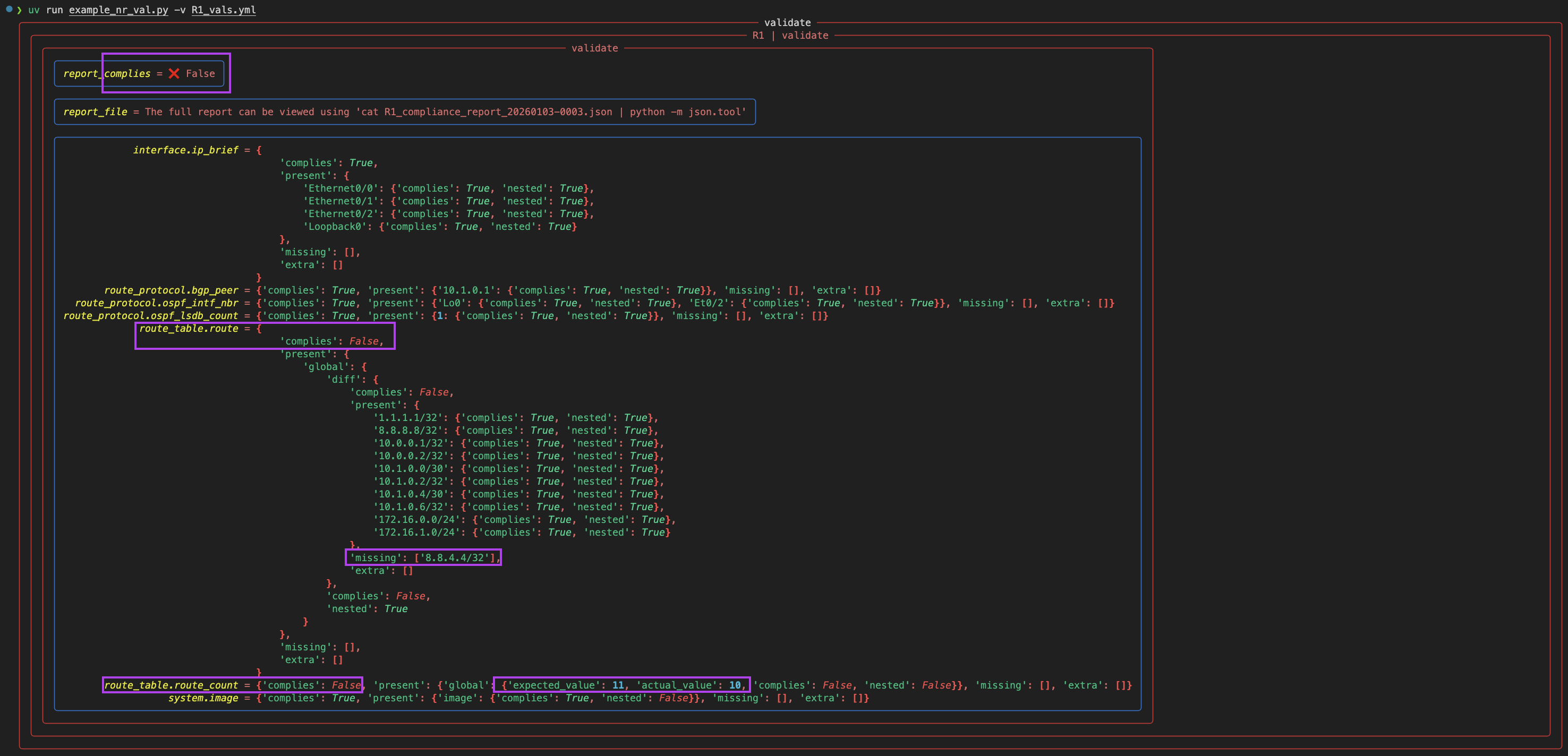
Example of a failed report due to global routing table missing 1 route (all other validations comply)