Auto-generation of Validation Files
Rather than defining validation files manually from scratch they can be automatically generated from a devices actual state based of an index of sub-features. If no index file is specified, validations will be generated for all enabled sub-features on the device.
Note
For validations with large amounts of data (such as route tables) using an index to auto-generate all validation entries and then pruning the unnecessary ones can be far more efficient than hand-defining each item.
Key Behaviors
The index file can be full path or the name of a file in the local directory
The generated validation files are named in the format:
<hostname>_vals.ymlInterfaces that are unassigned or admin down will be ignored and not added to the validations
The below validations can have environment-specific elements (such as VRF name), these must be manually defined in the index file.
Management ACL (system.mgmt_acl): If ACL names not specified will return all ACLs
MAC count (layer2.mac_table): If no VLANs defined only returns total number of MACs
Route table count (route_table.route_count): If no VRFs defined only returns total number of routes in global RT
Route table routes (route_table.route): If no VRFs defined only returns routes in global RT
WiFi client count (wifi.client_count): If no WLANs defined only returns total clients
Generating Validation Files
Running the generate_val_file task without any arguments will generate a validation file for all OS sub-features, see Key Behaviors regards environment-specific elements (VRFs, MACs, etc).
from nornir import InitNornir
from nornir_validate import generate_val_file, print_result_gvf

nr = InitNornir(config_file="config.yml")

result = nr.run(task=generate_val_file)
print_result_gvf(result, nr)
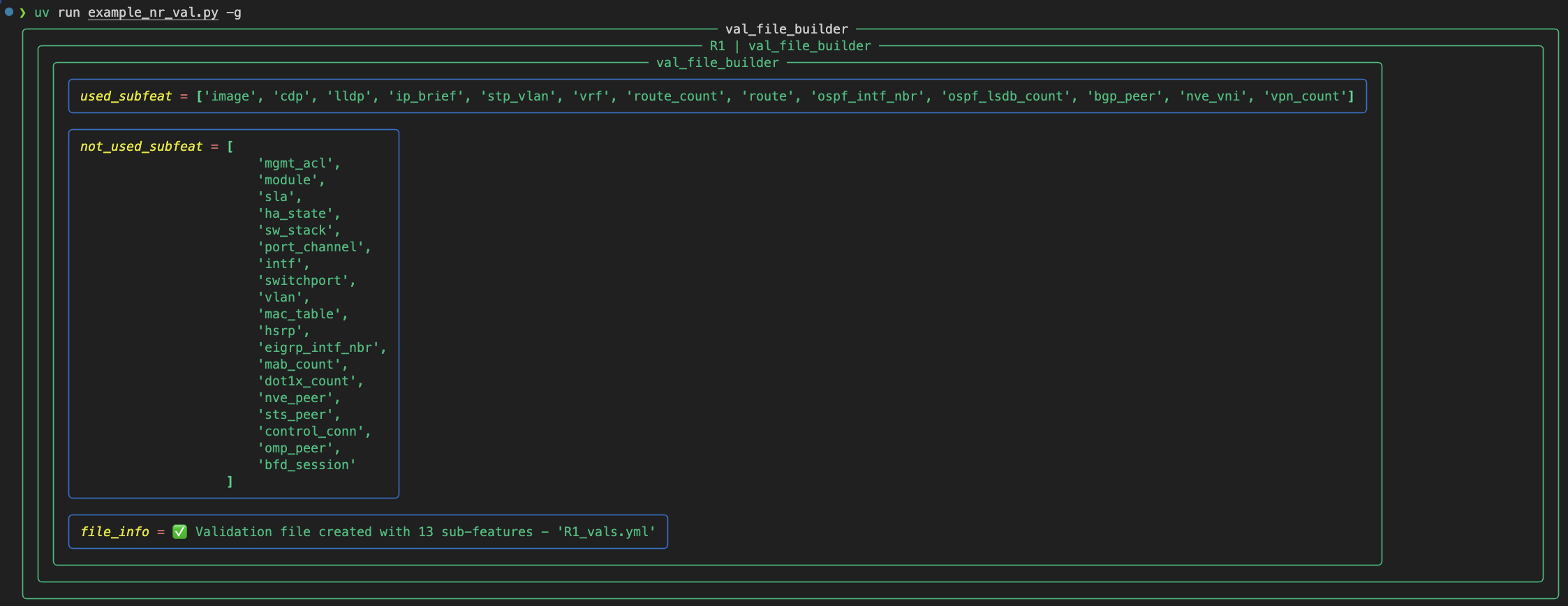
Example of automatically generating validation file for all enabled sub-features (no index file defined)
To generate a validation file for specific sub-features the input_data argument is used to pass in the index file data of those sub-features.
all:
  system:
    - image
  layer2:
    - vlan
    - mac_table: [vl52, vl10]
  route_table:
    - route_count: [BLU, GRN, TRI]
    - route: [TRI]
import yaml

with open("CORE_index.yml") as tmp_data:
    input_idx = yaml.load(tmp_data, Loader=yaml.Loader)

result = nr.run(task=generate_val_file, input_data=input_idx)
print_result_gvf(result, nr)
This would result in the following validation file being generated:
hosts:
  CORE:
    layer2:
      vlan:
        1:
          name: default
          intf: []
        10:
          name: COMPUTE_VL10
          intf:
          - Et0/3
        20:
          name: ACCESS_VL20
          intf: []
      mac_table:
        total_mac_count: 1
        vl10_mac_count: 0
        vl20_mac_count: 1
    route_table:
      vrf:
        BLU:
        - Vl20
        GRN:
        - Vl10
        TRI:
        - Et0/1
        clab-mgmt:
        - Et0/0
      route_count:
        global: 1
        BLU: 5
        GRN: 5
        TRI: 7
      route:
        global:
          10.0.0.3/32:
            nh: Loopback0
            rtype: C
        BLU:
          10.0.0.2/32:
            nh: 10.1.0.6
            rtype: B
          10.1.0.4/30:
            nh: Ethernet0/1
            rtype: B
          10.1.0.5/32:
            nh: Ethernet0/1
            rtype: L
          172.16.1.0/24:
            nh: Vlan20
            rtype: C
          172.16.1.3/32:
            nh: Vlan20
            rtype: L
Examples of complete index files for all supported operating systems can be found in the index_files directory.
By default the validation file is saved to the local directory (<hostname>_vals.yml), pass in a directory argument to save it elsewhere.
result = nr.run(task=generate_val_file, input_data=input_idx, directory="/Users/user1/Documents/folder1")
Gotchas
If a command returns empty data rather than raising an error the sub-feature will be treated as present in the returned on-screen result. In the validation file this is reflected by the sub-feature appearing as an empty dictionary.
To support generating validation files without providing an index file (of sub-features) the output from failed commands has to be suppressed as any sub-feature not enabled on the device will naturally fail (displaying all these false negatives would be confusing). If there was an actual issue such as wrong credentials or an ntc-template problem, no validation files will be created but the true error won’t be displayed. In such a case use the traditional nornir_rich print_result function instead of generate_val_file to see the true error message for troubleshooting.
from nornir_rich.functions import print_result

result = nr.run(task=generate_val_file)
print_result(result)
Note
If the returned result has no used_subfeat and/or file_info is empty it is likely due to an errored that couldn’t be cleanly handled (device connectivity, ntc-template bug, etc), again use print_result to investigate true reason for the failure.